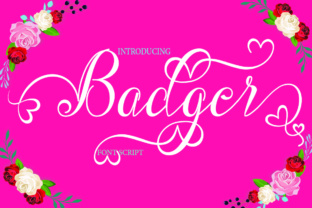
Badger: A Handwritten Font That Actually Works in Campaigns
I was halfway through building a 7-day Instagram content series for a new online course launch—think teaser posts, quote graphics, and Reels covers—when I opened the headline mockup on my phone and paused. The font felt off. Too stiff. Too generic. So I swapped in Badger, the modern handwritten font from Script Amp, and instantly saw the shift: warmth, intention, and just enough personality to feel human—not hurried.
What Badger Brings to Real Campaign Work
Badger isn’t “cute” or “quirky” in a distracting way. It’s a confident, slightly tapered handwritten typeface with subtle bounce and rhythm—like someone who writes beautifully but doesn’t overthink it. There’s no forced flourishes or exaggerated swashes. Instead, you get natural entry/exit strokes, consistent x-height, and gentle contrast between thick and thin lines. That balance makes it feel both approachable and intentional—perfect for campaigns where tone matters as much as timing.
In practice, that means Badger reads clearly at 48pt on a YouTube thumbnail, holds its own over textured backgrounds in Pinterest pins, and adds character to email banner headers without competing with your CTA button. It’s not trying to be everything—it’s designed as a display font, and it excels there.
Where It Shines (and Where to Pause)
Badger works best for short, high-impact text: headlines, campaign labels (“Early Access,” “New Season,” “Live Now”), quote callouts, logo-style wordmarks, and Reels cover text. I used it for a webinar banner set last month—“Your First Step Starts Here”—and the soft weight variation helped guide the eye straight to “Starts Here” without needing bolding or color tricks.
It’s also surprisingly versatile across digital contexts:
- Instagram posts: Paired with a clean sans serif (like Inter or Poppins) for body copy, Badger gives headers instant warmth—especially effective for lifestyle, wellness, or creative education brands.
- YouTuber thumbnails: Tested side-by-side, Badger outperformed two other script fonts in quick-scan clarity. Its letterforms open up cleanly—even at 32px on mobile previews.
- Pinterest pins: On light or muted backgrounds, the slight ink-like texture adds tactility without sacrificing legibility.
- Digital ads: Used sparingly (headline only), it creates visual distinction in crowded feeds—just make sure your ad platform renders OpenType features correctly.
That said, Badger isn’t built for paragraphs, pricing tables, or dense product specs. Don’t use it for body copy, legal disclaimers, or anything smaller than 24pt on screen. And while it handles light-to-medium gray overlays well, avoid pure white text on very light backgrounds—some glyphs lose subtle definition. Test it on actual device previews before finalizing.
Pairing Smartly—Not Just Stylistically
Handwritten fonts can easily tip into “unprofessional” if paired carelessly. With Badger, I default to pairing with a neutral, highly legible sans serif—something with open counters and generous spacing (like Montserrat, Lato, or the free Google Fonts version of Manrope). The contrast does two things: it grounds the energy of Badger, and it creates clear visual hierarchy without extra design labor.
I’ve also tested Badger against a restrained serif (e.g., Playfair Display) for editorial-style course landing pages—and it held up beautifully in hero sections, especially when the serif handled subheads and feature lists. Just avoid stacking it with another script or decorative font; the personality is already fully expressed.
Practical Notes Before You Drop It Into Your Workflow
Badger comes with multiple OpenType features: standard ligatures, discretionary ligatures, stylistic alternates, and contextual swashes. These aren’t just “nice-to-haves”—they matter. For example, turning on stylistic alternates smoothed out a tricky “Th” combination in a “Thank You” email banner. And the light weight (not just regular) gave me breathing room for secondary headlines without losing cohesion.
File formats include WOFF2 (for web), OTF, and TTF—so it’s ready for Figma, Adobe apps, Canva (via upload), and most CMS platforms. Licensing is commercial-friendly, including use in client work, digital products, and merch—but always double-check multilingual support if your audience spans languages beyond English, Spanish, and French (Badger covers Latin-based scripts well, but doesn’t include extended Cyrillic or Arabic).
One thing I appreciate: no hidden “light” or “thin” weights masquerading as full options. What’s listed is what’s usable—and all weights render consistently across browsers and devices. No surprises mid-campaign.
Final Real-World Takeaway
Badger doesn’t solve every typography problem—but it solves a very specific, very common one: how to add authentic, human energy to digital campaigns without sacrificing clarity or professionalism. It’s the kind of premium font that earns its place not because it looks expensive, but because it performs reliably across touchpoints—from the first scroll on Instagram to the final click on a landing page header.
If your next campaign needs voice, not just visuals, Badger is worth pulling from your font library. Just remember: let it lead the moment—not the message. Save the nuance for your copy. Let the type do what it does best: connect.